Pixel-perfect measurements, instantly.
The ultimate web developer tool for pixel-perfect measurements. Draw rulers, snap to elements, and inspect box model properties instantly.
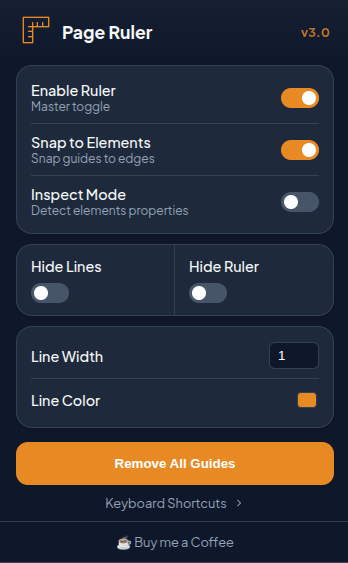
Everything you need to measure
Designed for developers and designers who demand precision.
Master Ruler
The core of Page Ruler. Drag horizontal and vertical guide lines from the top and left edges.
Use Alt + H and Alt + V to drop lines instantly at your cursor
position.
Measure Mode
A precision crosshair follows your cursor, showing live X/Y coordinates relative to the viewport. Perfect for quick alignment checks.
Grid Overlay
Toggle a customizable 12-24 column grid overlay. Adjust max-width and opacity to match your design system perfectly.
Deep Inspect PRO
Hover any element to see dimensions, spacing, and CSS properties. Click to pin the tooltip and copy computed CSS or Tailwind classes directly! Deep Inspect (Alt+P) lets you pierce through layout containers.
Pro Customization PRO
Customize ruler theme colors to perfectly match any website background, ensuring your guides are always visible and distinct.
How it Works
Get up and running in seconds.
Install & Pin
Add Page Ruler to Chrome and pin it to your toolbar for instant access anytime.
Toggle On
Click the icon or press Alt + R to activate the ruler on any webpage.
Measure & Inspect
Drag guides, snap to edges, or enter Inspect Mode to get pixel-perfect data instantly.
Work Faster
Master these keyboard shortcuts to measure at the speed of thought.
| Action | Shortcut |
|---|---|
| Toggle Ruler | Alt + R |
| Add Horizontal Guide | Alt + H |
| Add Vertical Guide | Alt + V |
| Delete Guide under Cursor | Alt + Backspace |
| Toggle Inspect Mode | Alt + I |
| Toggle Snap to Edge PRO | Alt + S |
| Deep Inspect (Parent Highlight) PRO | Alt + P |
| Measure Mode (Crosshair) | Alt + M |
| Toggle Grid Overlay | Alt + G |
| Lock Lines to Page PRO | Alt + L |